Apple has unveiled a powerful new capability for its Visual Intelligence feature in iOS 26. The technology now works directly with content displayed on your iPhone screen. This major upgrade was detailed in recent software updates.
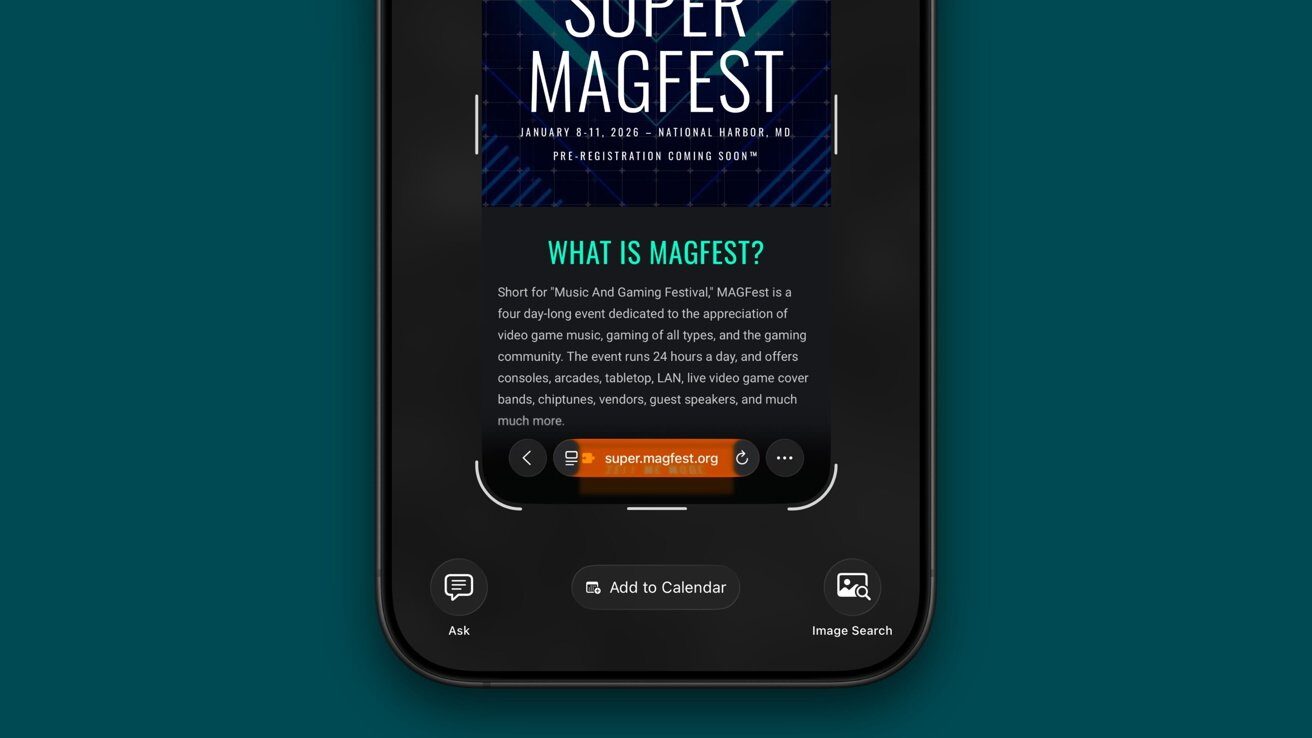
The feature is activated using the familiar screenshot command. It allows users to interact with on-screen information in revolutionary ways.
How to Activate and Use the New Screen Analysis
Using the feature is simple. Press the Side button and Volume Up button simultaneously to capture a screenshot. The new Visual Intelligence toolbar will then appear at the bottom of the screen.
According to reports, the options are context-aware. They change based on the content captured in the screenshot. This intelligent adaptation makes the tool incredibly versatile.
You can highlight a specific part of the image with your finger. The search function will then focus only on that selected area. This is perfect for identifying single items in a busy picture.
The “Ask” function opens a dialogue with ChatGPT. You can pose questions about the text or imagery in the screenshot. It provides explanations and deeper insights instantly.
The Broader Impact on User Productivity and Workflow
This integration signifies a shift towards more proactive smartphone assistance. It moves beyond simple camera-based recognition. The feature turns static screen captures into dynamic starting points for action.
For consumers, this means less app switching and manual copying. Information from news articles, social media, or messages can be acted upon immediately. It streamlines common tasks like saving events or researching products.
Industry analysts suggest this is a key step in Apple’s AI strategy. It deeply embeds Apple Intelligence into the core user experience. The functionality is currently limited to iPhone 15 Pro models and newer.
This advancement in iOS 26 Visual Intelligence fundamentally changes how we interact with information on our devices. It promises a more seamless and intuitive digital life.
Dropping this nugget your way-
What iPhone models support this feature?
This iOS 26 feature requires Apple Intelligence. It is exclusive to the iPhone 15 Pro, iPhone 16 series, and the upcoming iPhone 17 series. Older models cannot access these new capabilities.
Can Visual Intelligence read text from any app?
Yes, because it works from a screenshot, it can analyze text from virtually any application. This includes web browsers, social media apps, and productivity tools.
Is an internet connection required?
An active internet connection is necessary for most functions. Tasks like web searches, AI questions, and translations process data on Apple’s servers.
How does this differ from the standard camera version?
The camera version analyzes the real world through your lens. The new screen-based version analyzes digital content already on your phone, offering actions like adding calendar events directly.
Does this work with videos or only static screens?
Currently, it is designed for static screen captures. You would need to take a screenshot of a paused video frame to analyze its content.
জুমবাংলা নিউজ সবার আগে পেতে Follow করুন জুমবাংলা গুগল নিউজ, জুমবাংলা টুইটার , জুমবাংলা ফেসবুক, জুমবাংলা টেলিগ্রাম এবং সাবস্ক্রাইব করুন জুমবাংলা ইউটিউব চ্যানেলে।