Google is adding Motion Assist to Android as a way to make phone screens more comfortable to view during a car ride. The feature places a subtle bubble overlay on the display and moves it with the vehicle. Google says the visual movement is designed to help bridge the difference between what the eyes see on the screen and the motion felt by the body.
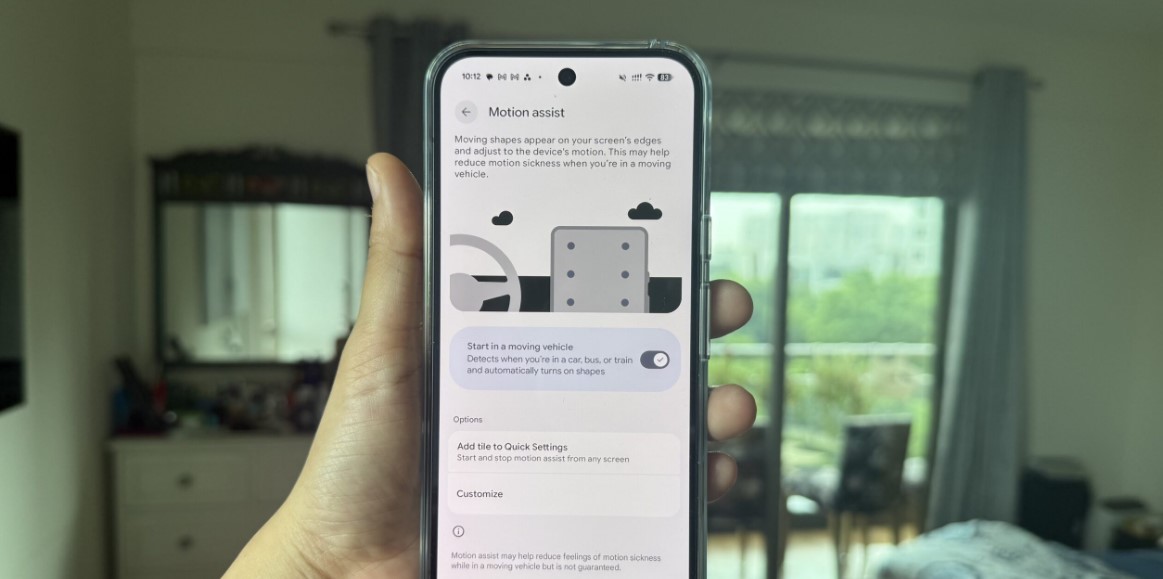
Motion sickness can make reading or watching a phone difficult for passengers. Google’s approach does not stop the car from moving and does not promise a medical solution. Instead, it changes the screen presentation so that the display provides an additional visual cue about the vehicle’s movement. The company says users can change the bubble’s shape, color and opacity.
The feature is designed to be easy to reach. Google says it can be set to turn on automatically or added to Quick Settings. That matters because a passenger may want it only for a particular trip. A control that is buried in a settings menu would be less useful than one that can be switched on before a journey begins.
Google’s announcement says Motion Assist is coming to phones running Android 17. Availability will therefore depend on the device, software version and rollout schedule. The company does not say that the overlay will work for everyone, and users should stop using the phone if they feel unwell. Drivers should never use it while operating a vehicle.
The feature also shows how small interface changes can address a very specific everyday complaint. There is no new hardware to buy, and the system does not require a phone accessory. The tradeoff is that it may take time for users to find a visual style that feels helpful rather than distracting.
Google is positioning Motion Assist as one part of a wider Android update that also includes Gemini and Messages features. The company’s description is the confirmed information available today. Independent user testing will show how effective the moving overlay is across different cars, road conditions and passengers, but Android’s next release will give users another tool to try when screen use in motion becomes uncomfortable.