Close Menu
iNews Zoombangla
  • Bangladesh
  • World
  • Tech
  • Business
  • Sports
  • Entertainment
  • Bangla
Facebook X (Twitter) Instagram
iNews Zoombangla
  • Bangladesh
  • World
  • Tech
  • Business
  • Sports
  • Entertainment
  • Bangla
iNews Zoombangla
Home English iOS 27 lets iPhone users start Recovery Assistant manually
English Software and Applications Technology

iOS 27 lets iPhone users start Recovery Assistant manually

By Soniya ChowdhurySeptember 15, 20262 Mins Read

Apple’s iOS 27 adds a manual way to start the iPhone Recovery Assistant screen. The change means a user does not have to wait for an iPhone to fail during startup before the recovery tools appear. MacRumors reported the change after Apple released iOS 27, while Apple’s support documentation explains the recovery process.
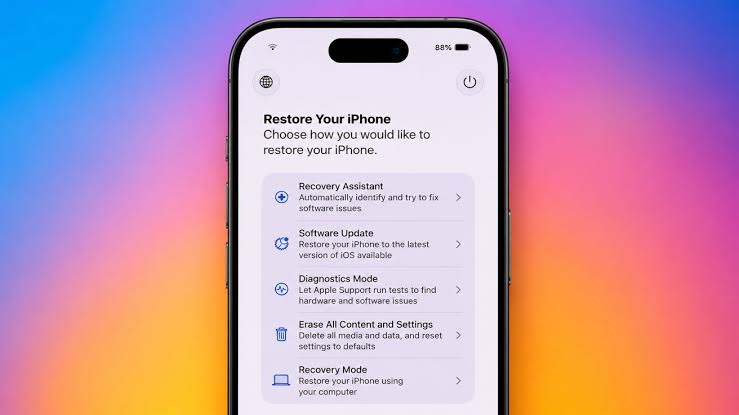
iOS 27 Recovery Assistant

Recovery Assistant is designed for situations in which an iPhone has a startup problem or repeated crashes. It can download a software package intended to resolve the issue. The process requires a Wi-Fi connection and can take several minutes, so it is not a quick setting for everyday troubleshooting.

Apple’s support instructions say the iPhone should be connected to a computer or power source before the user turns it off. The side button is then held until the connect-to-computer screen appears. That brings the device into the recovery flow, where the available options can be reviewed.

Advertisement

The manual access is useful because it gives owners a clear route to the tool. It does not mean every problem can be repaired on the phone. Apple says that if Recovery Assistant does not solve the startup issue, the device may need recovery mode and a restore using a computer.

Users should be careful before choosing any option that erases data. Recovery tools can help with software problems, but a reset or restore can remove information that has not been backed up. Apple recommends keeping a current backup and reading the on-screen instructions before continuing.

The feature is separate from ordinary iOS updates. Installing iOS 27 does not automatically repair a damaged device, and Recovery Assistant cannot fix physical damage, a failed battery or a broken display. Those cases may require service from Apple or an authorised provider.

iOS 27 therefore gives iPhone owners one more software-recovery path. The key benefit is earlier access to the assistant, not a promise that every fault can be fixed without support. If an iPhone repeatedly fails to start, users should follow Apple’s official steps and seek service when the recovery process cannot resolve the problem.
fXinmwalink@tg
Apple support iOS 27 iPhone recovery iPhone troubleshooting Recovery Assistant
Soniya Chowdhury
  • Website
  • Facebook
  • X (Twitter)
  • Instagram

Soniya Chowdhury is a journalist at Zoom Bangla News with seven years of experience in news writing and editorial work. She is involved in producing accurate, clear, and reader-focused content for digital platforms. Her work reflects a strong commitment to editorial standards and responsible journalism.

Related Posts
Android water damage

The first thing to do if an Android phone gets wet

September 15, 2026
iOS 27 Messages button

iOS 27 lets iPhone users hide the Messages dictation button

September 15, 2026
iOS 27 compact clock

iOS 27 adds a compact Lock Screen clock for less visual clutter

September 15, 2026

Latest News

Android water damage

The first thing to do if an Android phone gets wet

iOS 27 Messages button

iOS 27 lets iPhone users hide the Messages dictation button

iOS 27 compact clock

iOS 27 adds a compact Lock Screen clock for less visual clutter

iPhone Duo Apple Pencil

Apple says iPhone Duo will support Apple Pencil later this year

DJI Osmo 360 II

DJI Osmo 360 II brings native 8K/60fps capture to a new 360 camera

Zelda 40th Anniversary Switch 2

Nintendo sets October 29 for Zelda 40th Anniversary Switch 2 edition

Lenovo Motorola ownership

Lenovo’s tech portfolio still includes Motorola after its 2014 acquisition

Apple Store redesign

Apple store redesign brings back Genius Bars and dedicated pickup bays

Xiaomi 18 Fold

Xiaomi 18 Fold brings a 200MP camera and 6,000mAh battery to China

iPhone Duo Shift Left Edge

iPhone Duo adds a hidden display setting for protective cases


Inews

iNews Zoombangla is your trusted destination for fast, accurate, and relevant English news. We cover Bangladesh, world affairs, technology, business, sports, entertainment, lifestyle, science, and research for English-language readers. iNews Zoombangla is the English news edition of ZooBangla.

  • About Us
  • Contact Us
  • Career
  • Advertise
  • DMCA
  • Privacy Policy
  • Feed
  • Authors
  • Editorial Team Info
  • Ethics Policy
  • Correction Policy
  • Fact-Checking Policy
  • Funding Information
© 2026 ZoomBangla Pvt Ltd. - Powered by ZoomBangla

Type above and press Enter to search. Press Esc to cancel.

tgXwa