Apple’s iOS 27 gives iPhone owners a separate control for alarms and timers. The change means users can lower the phone’s ringtone without also reducing the sound used for a wake-up alarm. MacRumors reported the setting after iOS 27 became generally available on September 14.
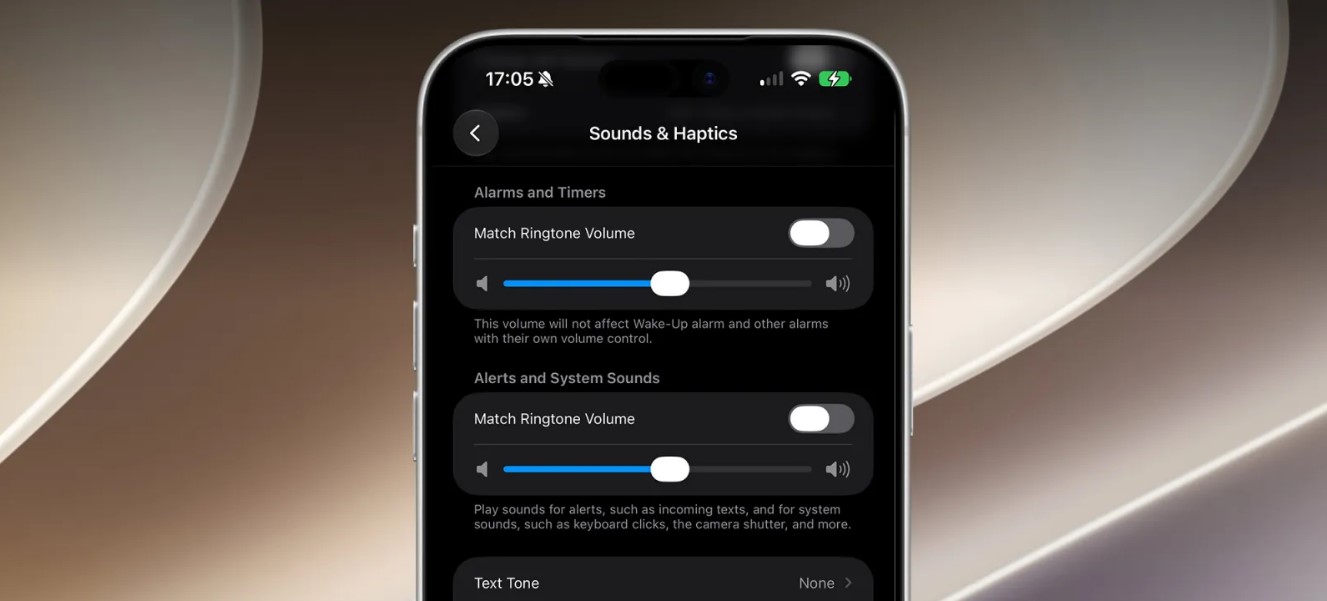
The control appears in Settings under Sounds & Haptics. Users can turn off the “Match Ringtone Volume” option in the Alarms and Timers section. A separate slider then appears for alarm and timer volume. Turning the option back on restores the older linked behaviour.
This is a small change, but it fixes a common problem. Someone may want a quiet ringtone during the day or overnight while still needing a loud alarm in the morning. Before iOS 27, changing the main volume relationship could make that balance difficult to manage.
Apple also includes another Match Ringtone Volume switch for alerts and system sounds. That control applies to sounds such as incoming messages, keyboard clicks and other system feedback. Users can therefore decide whether those sounds should follow the ringer or use their own level.
The independent setting does not replace volume controls inside every Apple feature. Wake-Up alarms that already have their own volume control, such as those associated with a sleep schedule, continue to use their individual setting. Users should check the alarm type if a sound level does not change as expected.
The feature is available as part of iOS 27 rather than as a separate app update. Apple’s public operating-system page lists iOS 27 as available for compatible iPhones, while MacRumors documents the path to the new control. The exact menus can vary slightly with language or regional settings.
For iPhone owners who have missed an alarm after lowering the ringer, the new option is a useful quality-of-life fix. It does not change the alarm sound itself. It simply gives alarms, timers, ringtones and system alerts more independent control, which should make everyday audio settings easier to manage.